The Simplest Way to Share a Build Schedule With Homeowners
By Colby Mueller, Founder, VestaBuilder
Share your build schedule with clients using a simple link, no login required. Milestone views, client-facing date buffers, and automatic change explanations. Here is the approach and the tool.
Custom home clients want to know where their build stands. That is not unreasonable. It is the biggest purchase of their lives and they are anxious by default. The problem has never been whether to keep them informed. The problem has been how to do it without drowning in check-in calls, without exposing them to schedule detail they will misread, and without signing up for a heavyweight client portal that your clients need a login and a password reset to use.
After talking with a lot of custom builders about this exact frustration, and after watching how many of them land on this site searching for a better way, we built something to solve it. But before the tool, here is the approach, because the approach matters more than any software.
The Principle: Share Milestones, Buffer the Dates, Explain the Changes
The builders who share schedules well without creating headaches follow three rules, whether they use software or a whiteboard. If you want the full version of this method, we wrote it up separately in how to share your build schedule with homeowners — and whether you should share at all is its own question, covered in should custom home builders share their schedule with homeowners.
First, they share milestones, not tasks. Clients see foundation complete, framing complete, rough-ins complete, drywall, finishes, walkthrough. They do not see the day-by-day task breakdown, because daily variance that is completely normal to a builder reads as chaos to someone who has never built a house. We published a custom home milestone schedule template you can use as a starting list.
Second, they buffer the client-facing dates. If framing finishes internally on the 15th, the client sees the 20th. Finishing ahead of the shared date builds confidence. Finishing behind it, even for good reasons, erodes trust. A small buffer keeps the builder consistently meeting or beating what the client expects.
Third, they explain every change proactively. When a shared date moves, the client hears why before they notice the shift. A short note like "framing ran long due to weather" turns a potential worry into a moment of trust. The builder is always the one to surface a change, never the client discovering it.
That is the whole method. Milestones, buffers, proactive explanations. The challenge has always been doing it consistently without it becoming a part time job.
Why the Existing Tools Miss
The construction platforms that offer client-facing schedules tend to make the same mistakes. They give clients a login and a portal, which most homeowners use once and forget. They expose the full task schedule, which creates exactly the anxiety the milestone approach avoids. And they bundle the client view into a heavyweight suite that costs a small fortune and takes weeks to learn.
None of them productize the parts that actually make schedule sharing work: the buffer between internal and client-facing dates, and the change explanations that build trust. Those get left to the builder to manage manually, which means they usually do not happen.
What We Built
We built homeowner schedule sharing into VestaBuilder around the method above, with a deliberate focus on being simple enough that a builder can turn it on in a couple of minutes and a homeowner can use it without any instruction at all.
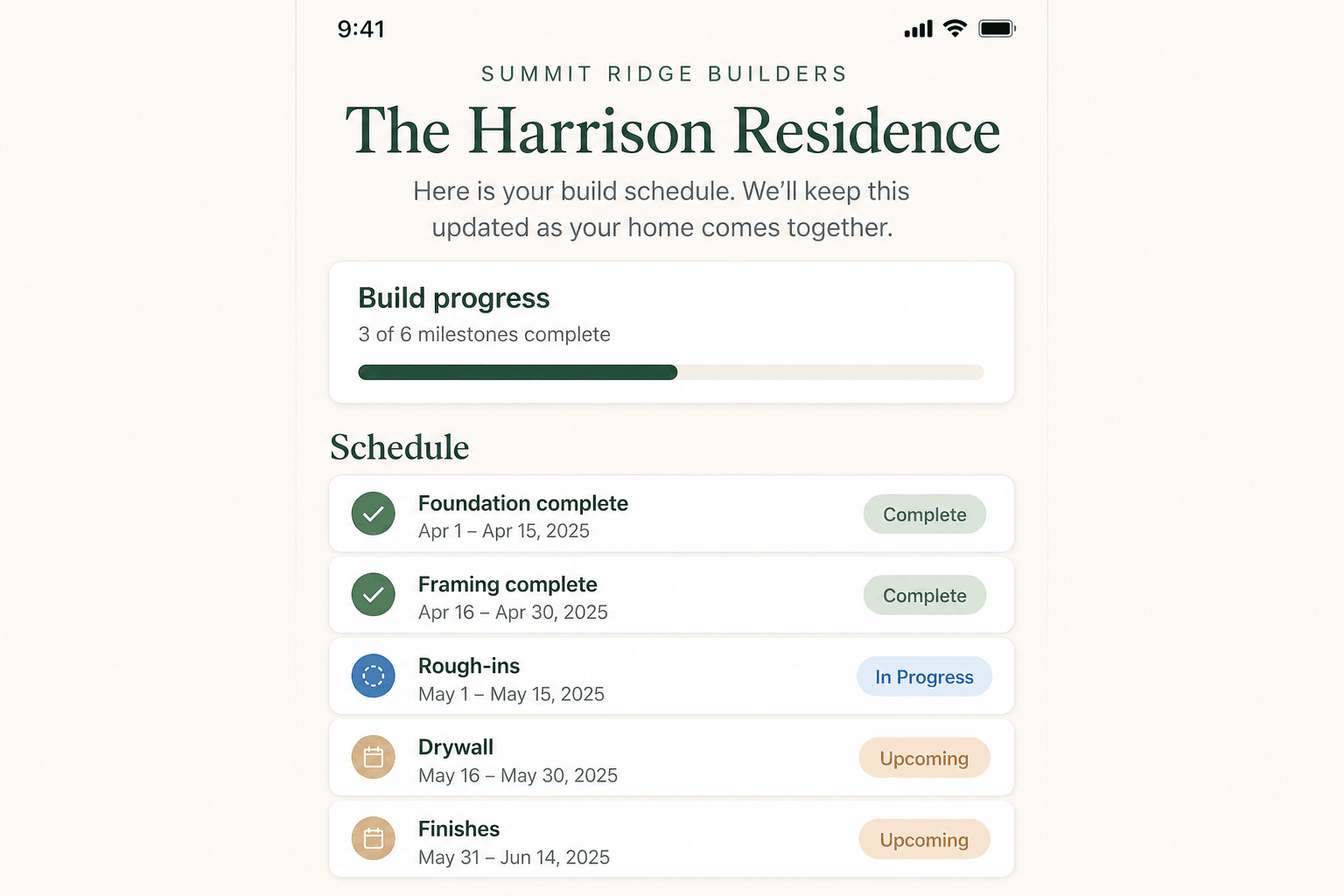
Here is how it works.
A link, not a login
The builder flips on sharing for a project and gets a private link. They text or email it to their client. The homeowner opens it on their phone and sees their schedule. No account, no password, no app to download. It works the way a shared document link works. If a builder ever wants to cut off access, they revoke or regenerate the link in one click. For clients who want privacy, there is an optional PIN.
The builder controls exactly what shows
Nothing is visible until the builder chooses it. They pick which milestones the client sees, and they can rename anything to a client-friendly label, so "rough-in inspections" shows instead of an internal task code. The client sees a clean, understandable view of their build, not the builder’s working schedule.
Client-facing date buffers, built in
This is the part no other tool does. The builder sets an optional buffer, and every client-facing date shifts by that amount automatically. The internal schedule stays exact for the builder and the subs. The client sees the slightly more conservative dates. The technique that experienced builders use manually is now just a setting.
A change log with reasons
When a shared date moves, the builder adds a one line reason, and the homeowner sees a running history of schedule updates with those explanations. The proactive communication that builds trust happens as a natural part of updating the schedule, instead of being a separate task the builder has to remember. Clients see that dates change for real, understandable reasons, and that the builder is on top of it.
Weather context, if you want it
Because VestaBuilder already logs weather delays against tasks, a builder can optionally surface that context on the client page. When a stretch of bad weather moves a milestone, the client can see that the delay was weather, not disorganization. Credible context, automatically.
Why Simple Wins Here
The instinct with a client-facing feature is to add more: comments, approvals, document sharing, notifications, accounts. We deliberately did not. A homeowner does not want a project management workspace. They want to glance at their phone and see that their house is progressing and roughly when the next milestone lands. Anything beyond that adds friction for the client and moderation burden for the builder.
If a client has a question, the page shows the builder’s contact info with a simple prompt to reach out. That routes questions into the direct conversation where they belong, rather than a comment thread nobody monitors. Simple is not a limitation here. It is the point.
The Result
A builder can share a clean, accurate, trust-building schedule with a client in about two minutes of setup, and the client can use it with zero instruction. The buffer keeps the builder ahead of expectations. The change log turns every schedule shift into a moment of transparency instead of a source of worry. And none of it requires the client to create an account or the builder to learn a complicated platform.
That accuracy is only as good as the schedule underneath it, which is why VestaBuilder keeps your dates honest through automatic SMS coordination with your subs. Get that right and the client-facing view takes care of itself.
Homeowner schedule sharing is live in VestaBuilder now. Link-based access with no client login, builder-controlled visibility, client-facing date buffers, and a change log that keeps clients informed automatically. Built for custom home GCs by a Colorado founder. Request a quick walkthrough to see it, or reach out to get set up on your next build.