For custom home builders

Keep every custom home build on schedule.

Scheduling and SMS reminders built for general contractors who need subs to show up when it counts — plus a free tool to share a client schedule by link, no account required.

No account required · Share a client link in about 60 seconds

Questions? Send us a note and we'll follow up.

Stop chasing. Start building.

Less chasing and fewer missed handoffs, so you can focus on quality instead of voicemail.

  • One timeline, whole crew

    See tasks, dependencies, and who is on the hook in a single dashboard so nothing slips between trades.

  • Replies read and acted on automatically

    When a sub texts back, AI reads their reply, updates the task status, and flags reschedule requests for you -- no inbox to monitor, no manual entry.

  • SMS that actually gets read

    Automated reminders land where subs already live: on their phone. No app to download, no portal to log into.

  • Built for custom homes

    Designed around long-cycle residential jobs: moving dates, weekend rules, and the messy reality of the job site.

  • Weather logged automatically

    Daily site conditions are captured in the background so you are not stuck logging them by hand, and you have a clear record when weather drives a delay.

  • Share a schedule clients love

    Send homeowners a private link -- no login, no app. You choose which milestones show, add a built-in date buffer, and a change log explains every shift automatically.

The product

Built for the job, not the office

A clean dashboard that shows you exactly where each trade stands, without the learning curve.

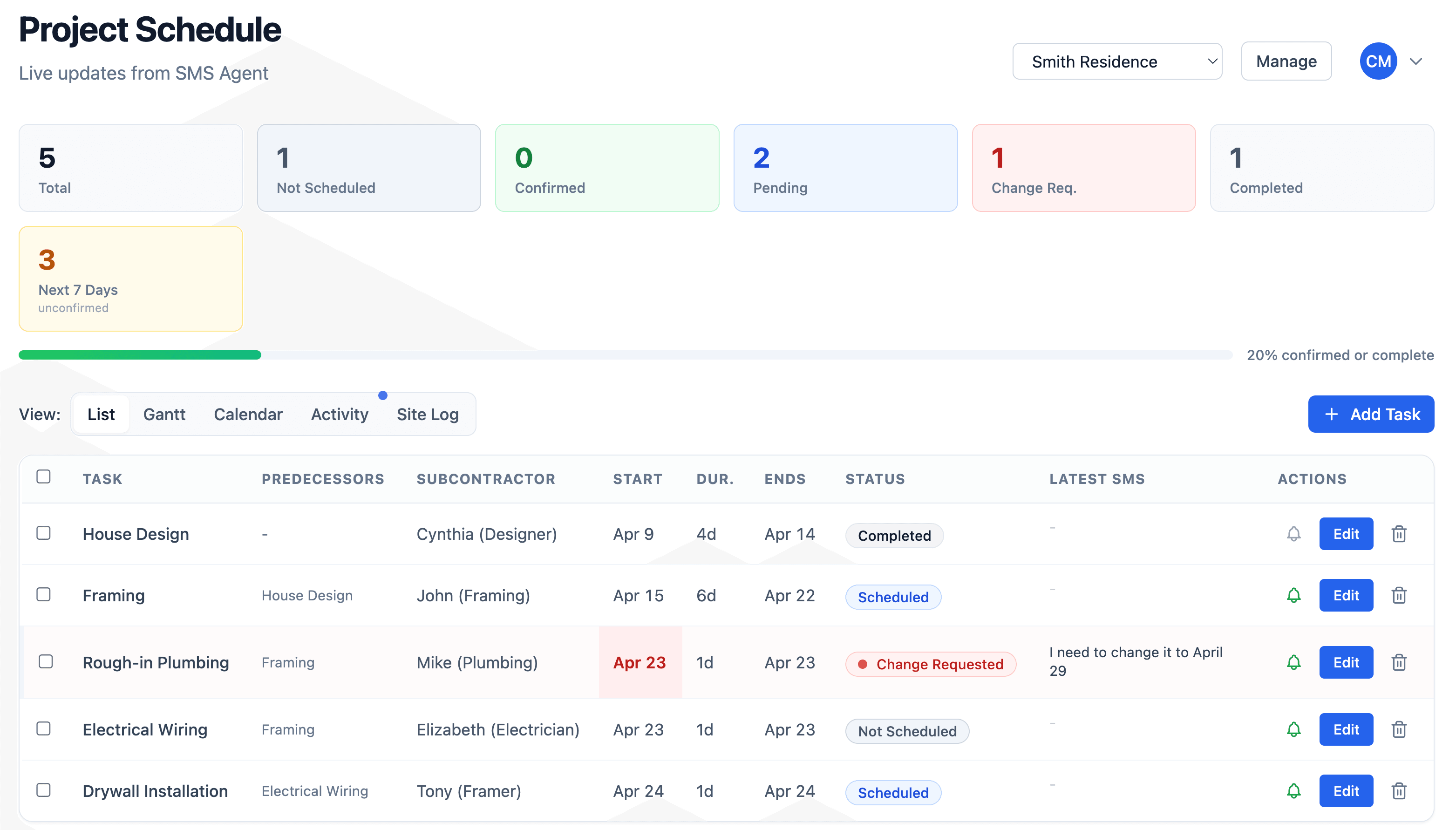
VestaBuilder schedule list view showing tasks with subcontractors, dates, and statuses

Every task, subcontractor, date, status, and latest SMS reply in one scrollable view.

What sets us apart

Share a schedule homeowners actually use

The big platforms bury the client view in a heavyweight portal with logins, password resets, and the full task list that makes homeowners anxious. VestaBuilder does the opposite: a clean, private link your client opens on their phone in one tap.

  • A link, not a login. Text or email a private link. No account, no app, no password reset. Revoke or regenerate it in one click, with an optional PIN.
  • You control what shows. Pick which milestones the client sees and rename them to client-friendly labels. They never see your working task schedule.
  • Client-facing date buffers. The technique experienced builders use by hand, built in: client dates shift by a buffer you set while your internal schedule stays exact.
  • A change log with reasons. When a date moves, add a one-line reason. Clients see a running history and hear about shifts from you first.

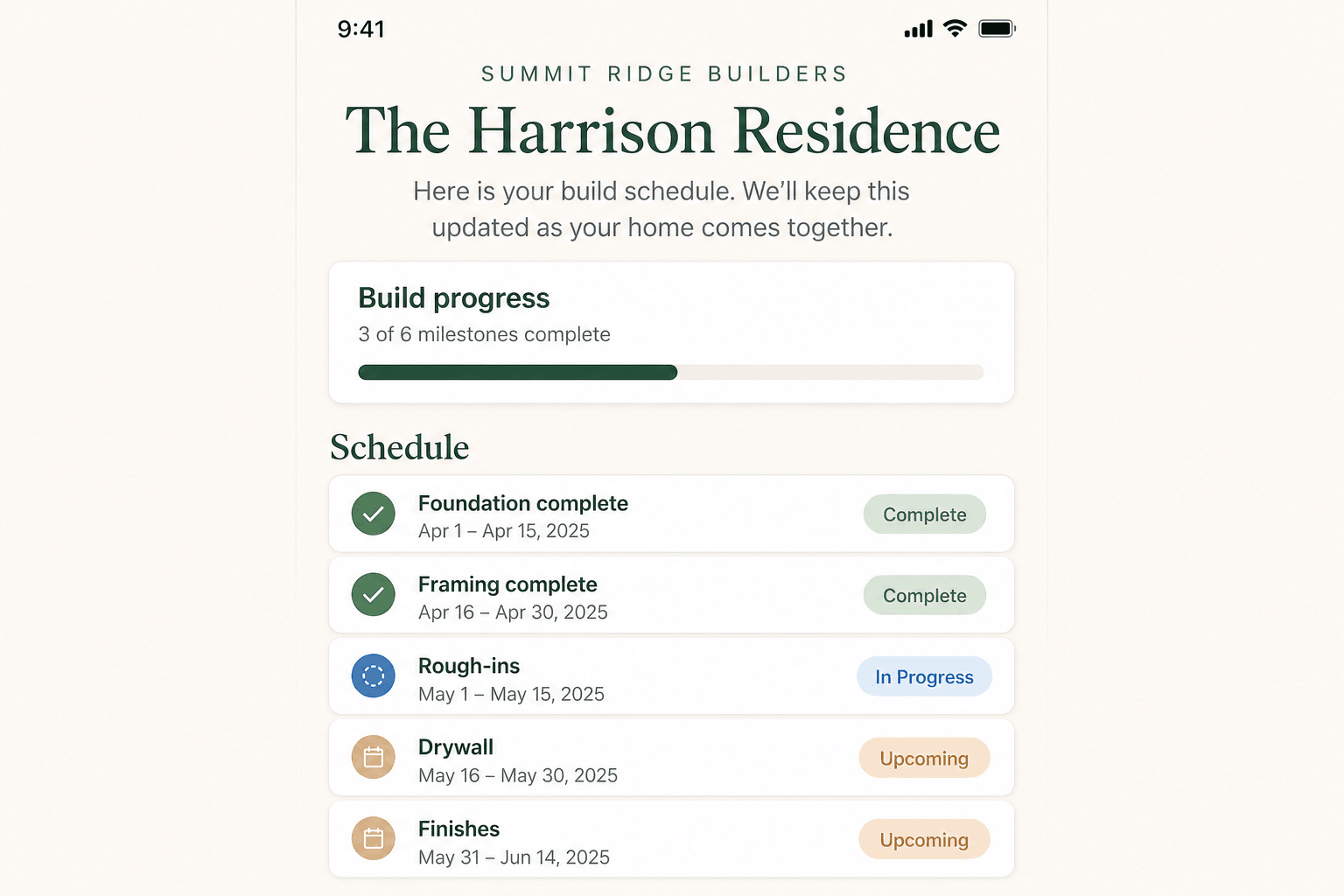
See what your client would get, then upgrade to live updates, sub SMS, and date buffers.

Homeowner-facing build schedule on a phone showing milestones with Complete, In Progress, and Upcoming statuses

How it works

  1. 1

    Plan the job

    Import or build your schedule, assign trades, and set durations the way you already think about the build.

  2. 2

    Reminders go out automatically

    VestaBuilder texts subs before critical dates. When they reply, AI reads the message, updates the task, and flags anything that needs your attention.

  3. 3

    Adjust on the fly

    When dates move, update once and keep the crew aligned without re-broadcasting from memory.

What builders are saying

  • I've been a custom home builder for over 25 years and I've used everything from BuilderTrend to old-fashioned Excel spreadsheets. VestaBuilder has been a game changer. It's simple, user-friendly, and the SMS messaging to my subs and vendors directly from my calendar is an amazing feature.

    Wayne Stover

    Founder, Ellex Construction, LLC

From the blog

Practical guidance for custom builders

View all posts

Get in touch

Ready when you are

We're onboarding builders manually right now. Tell us about your jobs and we'll follow up with the right next step.

  • Share how many projects you're running and how you schedule today.
  • We'll reply from VestaBuilder and help you decide whether a walkthrough makes sense.